
Features
Explore the features.
Explore the controls behind the menu, from target selection to capture and input. Every licence duration includes the same features.
View pricesAim & tracking
Choose the target point. Set the response. Keep control of the details.
- Target selection
- Head, neck, body, nearest and random targeting, plus a custom body range.
- Custom range & offsets
- Place two points on the body selector to define a range, or apply individual X/Y offsets.
- Strength, FOV & deadzone
- Adjust assistance strength, the detection radius and the centre area where correction stops.
- Sticky tracking
- Independent enable, strength and toggle key for target retention.
- Prediction
- Enable movement prediction and tune its calibration for your setup.
- Timing & movement
- Reaction and target-switch delays, progressive slowdown and humanization controls.
- Activation
- Primary and backup aim keys, with an optional auto-aim setting.
Weapon profiles
An AR and a shotgun do not need the same settings. Give each slot its own profile.
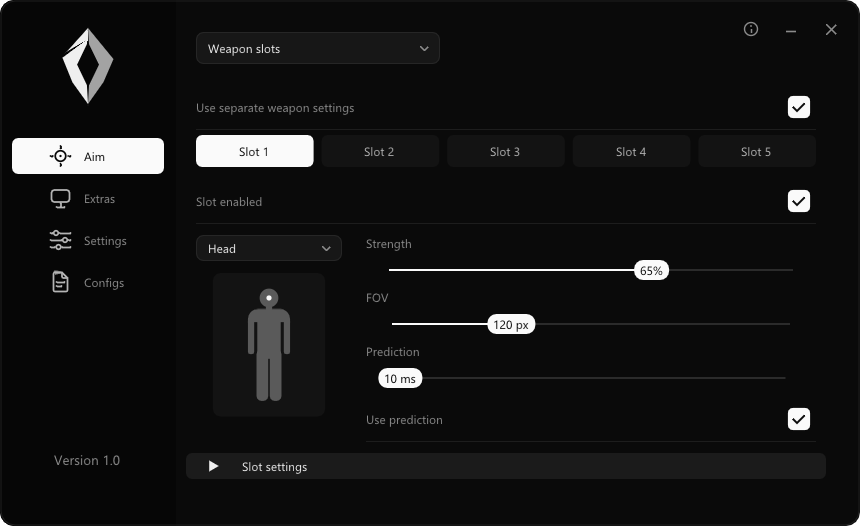
- Five independent slots
- Enable each slot separately and assign a weapon-switch binding.
- Per-slot aim
- Individual strength, FOV, ADS adjustments and X/Y sensitivity.
- Per-slot prediction
- Enable prediction and assign a prediction key for each weapon profile.
- Trigger & recoil slots
- Keep trigger and recoil behaviour separate for each slot.
- Saved with your config
- Store the weapon setup alongside your main aim and game settings.
Trigger & recoil
Separate controls for activation, timing and recoil adjustment.
- Trigger modes
- FOV, inside-target and centreline modes with adjustable detection radius.
- Shot timing
- First-shot delay and repeat delay, plus optional random delay with minimum and maximum values.
- Key activation
- Enable key activation and configure the trigger key.
- Recoil adjustment
- Toggle recoil correction and set its strength, globally or by weapon slot.
Visuals & AI
See what the model recognises, with an overlay you can make your own.
- Crosshair
- Custom crosshair with optional spin, colour, thickness and opacity controls.
- Detection indicators
- Full or corner boxes, detection lines, target points and confidence labels.
- FOV display
- Show the aim radius and adjust each widget’s appearance.
- Model selection
- Choose a compatible model and filter the object classes it detects. A compatible model is required.
- Recognition controls
- Adjust confidence, NMS threshold and detection input size.
- Overlay controls
- Enable only the indicators you want and save their settings with your profile.
Configs & game settings
Your settings stay together. Start with a preset and change what matters to you.
- Config management
- Create, load, save, import, export and delete configs. Choose a startup profile.
- Starting presets
- Balanced, Precision, Smooth and Manual Input Only presets.
- Game sensitivity
- References for Fortnite, Apex Legends, Siege, Call of Duty and custom games. Enter your in-game sensitivity.
- Custom targeting
- Save the body point, custom range, offsets and weapon settings in each config.
Capture & runtime
Choose the source and input path that fit your hardware.
- Desktop capture
- Desktop duplication and Windows capture options.
- Video sources
- Camera and capture-card input, with NDI and UDP options for configured streams.
- Multithreaded processing
- Separate capture and detection workers, with runtime monitoring.
- Performance information
- Check processing FPS, runtime information and hardware details in the app.
- Colour tracking
- Key activation, strength and target colour controls.
- Manual Input Only
- A mode that disables automated aim, trigger, recoil and colour-tracking outputs. This is not a tournament-approval guarantee.
Interface & integrations
A minimal menu, with the option to adjust how it looks and connects.
- Interface appearance
- Custom accent colour, scale, rounding and transparency.
- Discord Rich Presence
- Optional integration, requiring a configured Discord application ID.
- Mouse & external output
- Device settings include Windows mouse input, Arduino, KMBox Net/A, MAKCU, RP2350 and Teensy 4.1 paths.
- Xbox input
- Tested with an Xbox controller in Fortnite on PC, including aiming and trigger firing. Connect directly to the PC by USB and select CONTROLLER. No Arduino, USB Host Shield or external input bridge is required. Uses the virtual Xbox driver. PlayStation controllers remain untested; console support is unconfirmed.
Compatibility.
Implemented options and testing status, so you can check your setup before buying.
| Setup | Current status |
|---|---|
| Windows 10 and 11 | Target platforms. DirectML build verified; speed depends on the GPU, model and settings. |
| CUDA | Validation pending. |
| Xbox / XInput | Tested in Fortnite on PC, including aiming and trigger firing. USB connection directly to the PC; no external input bridge required. Uses the virtual Xbox driver. |
| PlayStation / DirectInput | Not currently implemented. |
| External input devices | Device paths are listed in the app. Firmware and hardware compatibility need to be checked for each setup. |
| NDI / UDP / capture card | Input options implemented. Source configuration and hardware validation required. |
| Cloud gaming | Compatible Windows PC capture setup required. |
| Console | Not confirmed. |
No universal device, game, detection-safety or FPS guarantee. Read the usage FAQ.
Discord
Stay in the loop.
Follow development, ask a question and get the latest release news.